What are phone call notes?
Phone call notes are a short written record of a call: who you spoke to, what was discussed, what was decided and who does what next. They fit on half a page, so you can read them back weeks later in half a minute.
Call notes are about what happened on one call. They are not a transcript, which holds every word, and they are not a call log, which is a list of calls. A colleague who was not on the call should be able to pick up the work from your notes alone.
The name causes some confusion, because Google also has a feature called Call Notes on Pixel phones. That feature gets its own section below. Everything up to there applies to any phone and needs nothing more than a pen.
What should phone call notes include?
Phone call notes should include who you spoke to and when, a short summary, the action items with an owner and a date, the decisions, and any open questions. Keep decisions apart from action items, because a decision is not a task.
Who and when
Name, company, date and who called whom. Three months from now this is how you find the note again.
A short summary
Two to five sentences on why you spoke and how it ended, written for someone who was not on the call.
Action items
One line each: what has to happen, who does it and by when. An action item without a name usually does not get done.
Decisions
What was actually agreed, on price, planning or scope. When someone remembers it differently later, this is the line you look up.
Open questions
What you could not answer on the call. Writing these down stops them from quietly disappearing.
Phone call notes template: what does it look like?
This phone call notes template has one block per item: call details, summary, action items, decisions, open questions and next step. Copy it from this page into a document or your CRM. There is nothing to sign up for.
| Block | What to write |
|---|---|
| Call | Person, role, company, phone number, date, time, length, who called |
| Summary | Two to five sentences: why you spoke and how it ended |
| Action items | What, who, by when. One line per item |
| Decisions | What was agreed, in the words you would use in an email |
| Open questions | What nobody could answer yet, and who finds out |
| Next step | The next contact: what it is and when |
Spoke with: [name, company]. Date: [date]. Summary: [two sentences]. Action items: [what, who, by when]. Decisions: [what was agreed]. Open: [questions]. Next step: [what, when].
This call notes template also works as a sales call report template. Add one line on where the deal stands, and keep the next step specific enough to put in your calendar.
Phone call notes example: what does a filled-in note look like?
A good phone call notes example is short and specific: a named person, a date, what they asked for, and who does what by when. The call below is made up, and it uses the template above.
| Block | Notes |
|---|---|
| Call | Dana Whitlock, purchasing manager, Brindlewood Fasteners, (312) 555-0142. 22 October 2026, 2:30 pm, 14 minutes. Dana called us. |
| Summary | Dana wants to move her standing order of shipping cartons from quarterly to monthly deliveries, because her warehouse is short on space. She is happy with the cartons themselves and asked for a new quote. |
| Action items | Marcus sends a quote for monthly deliveries by 27 October 2026. Priya checks January delivery slots by 28 October 2026. Dana sends her forecast for the first quarter by 28 October 2026. |
| Decisions | Monthly deliveries start in January if Dana accepts the quote. The yearly volume stays the same. |
| Open questions | Does the current price per carton hold for smaller deliveries? Marcus finds out. |
| Next step | Call Dana on 29 October 2026 at 10:00 am to go through the quote. |
How do you take notes during a phone call?
When you take notes during a phone call, write down only names, numbers, dates and what was agreed, in short phrases, and fill in the rest right after you hang up. Trying to capture everything means you stop listening.
Numbers and spelling are the two things you will not remember, so those go on paper first. Everything else can wait. If you did not catch something, ask: “Let me read that back to you” takes five seconds and also tells the other person what you heard.
Typing on the phone you are calling with rarely works. Use paper or a second screen, and put a headset on if you can, so that both hands are free.
How do you write up call notes after a call?
Write up call notes within a few minutes of the call, while you still remember it. Start with the action items, then write the summary, and send a copy to the other person if you agreed something.
Start with the action items
They are the part that gets lost first. Give each one a name and a date before you do anything else.
Write the summary
Two to five sentences, without the small talk. If you need more, you are probably retelling the call.
Add the decisions and the open questions
Check them against your scribbles from the call. Numbers and dates are worth a second look.
Send a copy if something was agreed
A short email with the action items stops two people from walking away with two versions of the same call.
That takes five minutes per call, which is fine for a few calls a week. With ten calls a day those minutes are the first thing to go, and that is usually when people start looking for an app.
What are Call Notes on a Google Pixel?
Call Notes is a feature in the Phone app on Google Pixel phones that transcribes a call and writes a summary on the phone itself. It works on the Pixel 9 and later, except the A series, in countries including the US and Canada, and everyone on the call is notified when you turn it on. If you have one and only need notes for yourself, it may be all you need.
According to Google, you start Call Notes with a button on the call screen, and you can set it to run automatically for selected numbers. Your recording, transcript and summary stay on the device and are not shared with Google. The summary appears next to the call in your call log, and you choose how long Call Notes are kept before they are deleted.
There are a few limits. Summaries are only available in English, and you need a SIM card from the country you use the feature in. The notes also stay on that one phone, which matters as soon as a colleague or a CRM needs them.
Can an app take phone call notes for you?
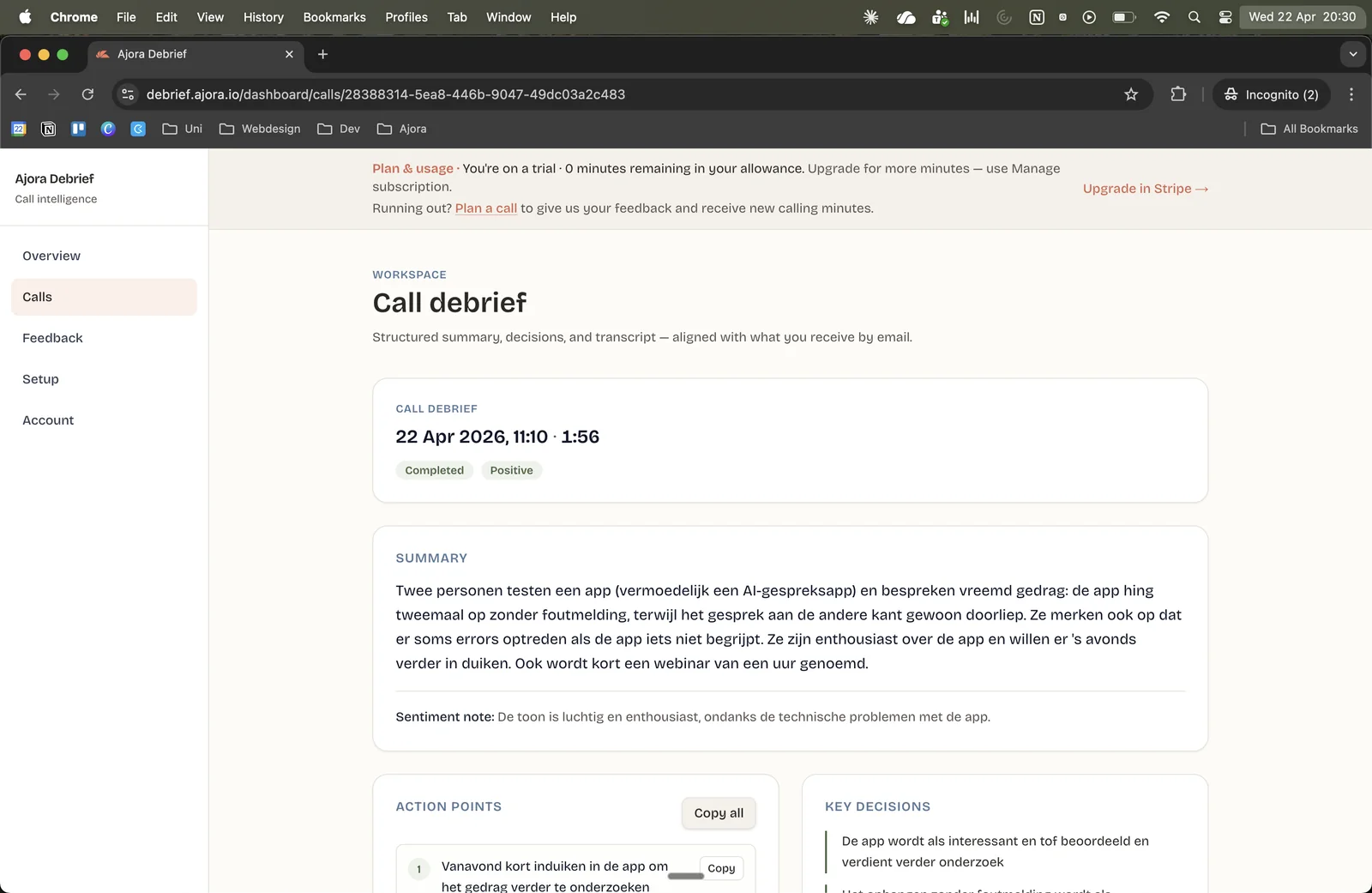
An app can take phone call notes for you if it can hear both sides of the call. Ajora, an app that automatically records your phone calls and turns them into a summary with action items, does that for calls you dial from the app. A few minutes after you hang up, the notes are in the app and the web dashboard.
That first condition rules out more than you would expect. A call notes app has to get at the audio of the call, and on an iPhone a voice recorder hears little of the other person. On Android it depends on brand and model. So the options that work are built into the phone, or they join the call. Here is how they compare, as described by Google, Samsung and Apple on 31 October 2026.
| Option | Works on | What you get | What the other person hears |
|---|---|---|---|
| Pen and paper | Any phone | The notes you write yourself | Nothing |
| Pixel Call Notes | Pixel 9 and later, except the A series, with a local SIM | Transcript and AI call summary on the phone, in the call log | Everyone on the call is notified |
| Samsung call recording | Galaxy phones with One UI 7 or later. No transcripts or summaries on the A56 5G, A36 5G, A26 5G or A17 5G | Recording, transcript and summary on the phone, with a Samsung account | An audio notification. People added later are not notified |
| iPhone call recording | iOS 18 or later, in supported regions, on calls with one other person | Recording and transcript in the Notes app. A summary needs Apple Intelligence | An audio notice that the call is being recorded |
| Ajora | iPhone and Android, on calls you dial from the Ajora app | Summary, action items, decisions and transcript in the app and the web dashboard | No beep or announcement, so you tell them yourself |
Ajora works differently from the buttons on your phone. You dial from the Ajora app and Ajora joins the call over the internet, so you need Wi-Fi or cellular data. There is nothing to do during the call. Afterwards the AI call notes are ready with the summary, the action items, the decisions and the full transcript. Which tool fits which kind of call is in AI note taker for phone calls, and if you already have a recording, start with transcribing a phone call.
The recording is stored encrypted in Germany and deleted automatically after 90 days by default; you set that period yourself, from 1 day to 7 years. You can play a call back in the app, but the audio cannot be downloaded.
When you do not need Ajora
A few calls a week
Pen, paper and the template above are fine. No app will save you much time here.
A recent Pixel, and notes only for yourself
Call Notes is already on your phone and needs no extra app. The same goes for a Samsung or iPhone with its own transcription, if you have no team or CRM to feed.
A cloud phone system
If your team calls through a business phone platform, check its settings first. It may already write summaries.
Calls that mostly come in to you
What this article says about Ajora covers calls you dial from the Ajora app. If most of your calls start on the other side, a button on your phone or a pen is the place to start.
Where Ajora does add something is in notes that do not stay on one phone. They work the same on iPhone and Android and land in a dashboard, and they can go on to your CRM: a ready-made integration logs them on the contact in Apollo, and the API and webhooks cover other systems.
Do you have to tell someone you are recording a call?
Recording rules vary by US state, and some states require everyone on the call to agree. Written notes record nothing, but a recording app does. The recorders built into Pixel, Samsung and iPhone tell the other person. Ajora plays no beep or announcement, so telling the other person is up to you.
The easy way out is one sentence at the start of the call: “I’m recording this so I don’t miss anything, is that okay?” In Canada, the federal privacy commissioner recommended in a 2007 finding that a company tell people at the start of a marketing call that it is being recorded, and why. This is not legal advice; check the rules for where you and the other person are.
You can try Ajora free for 7 days. Create your account at debrief.ajora.io/register, download the app for iPhone or Android, and dial your next call from the app.
Frequently asked questions about phone call notes
What is the difference between call notes and a call log?
A call log is a list of calls: who, when and how long. Call notes are about what was said on one call. If you are after a call log template, a spreadsheet with a row per call does the job, and the notes can sit in a column or a separate document.
How long should call notes be?
Half a page at most. If your notes run longer, you are probably writing a transcript. Keep the action items and decisions, and cut the rest.
Can I use this template for sales calls?
Yes. Add one line on where the deal stands and make the next step specific. More on what happens after a sales call is in how to record sales calls on your phone.
Can AI write call notes from a recording?
Yes, if you have a transcript. Paste it into ChatGPT or Claude with a prompt such as: “Turn this transcript into call notes. Start with a summary of no more than five sentences. Below it, list the action items as separate points, each with who picks it up and by when. List the decisions separately. Do not add anything that is not in the transcript.”
Can I download the recording?
No. You can play a call back in the app; the audio cannot be downloaded.
How fast are the notes ready?
With Ajora, the notes are ready a few minutes after you hang up, in the app and in the web dashboard.
Sources
- Use Call Notes in Phone app: devices, countries, SIM, notice and storagePhone app Help, Google, accessed 31 October 2026
- How to record phone calls on Galaxy phones: One UI version, models and audio notificationSamsung Support US, accessed 31 October 2026
- How to record a call on iPhone and iPad: iOS 18 and laterApple Support, accessed 31 October 2026
- Record and transcribe a call on iPhone: audio notice, Notes app and regionsiPhone User Guide, Apple, accessed 31 October 2026
- iOS and iPadOS Feature Availability: call recording, transcription and summaries by languageApple, accessed 31 October 2026
- Introduction to the Reporter’s Recording Guide: one-party and all-party consentReporters Committee for Freedom of the Press, accessed 31 October 2026
- PIPEDA Case Summary #2007-384: seeking consent to the recording of outgoing marketing callsOffice of the Privacy Commissioner of Canada, 21 June 2007

One of the three co-founders of Ajora. Jort focuses on user experience and growth.