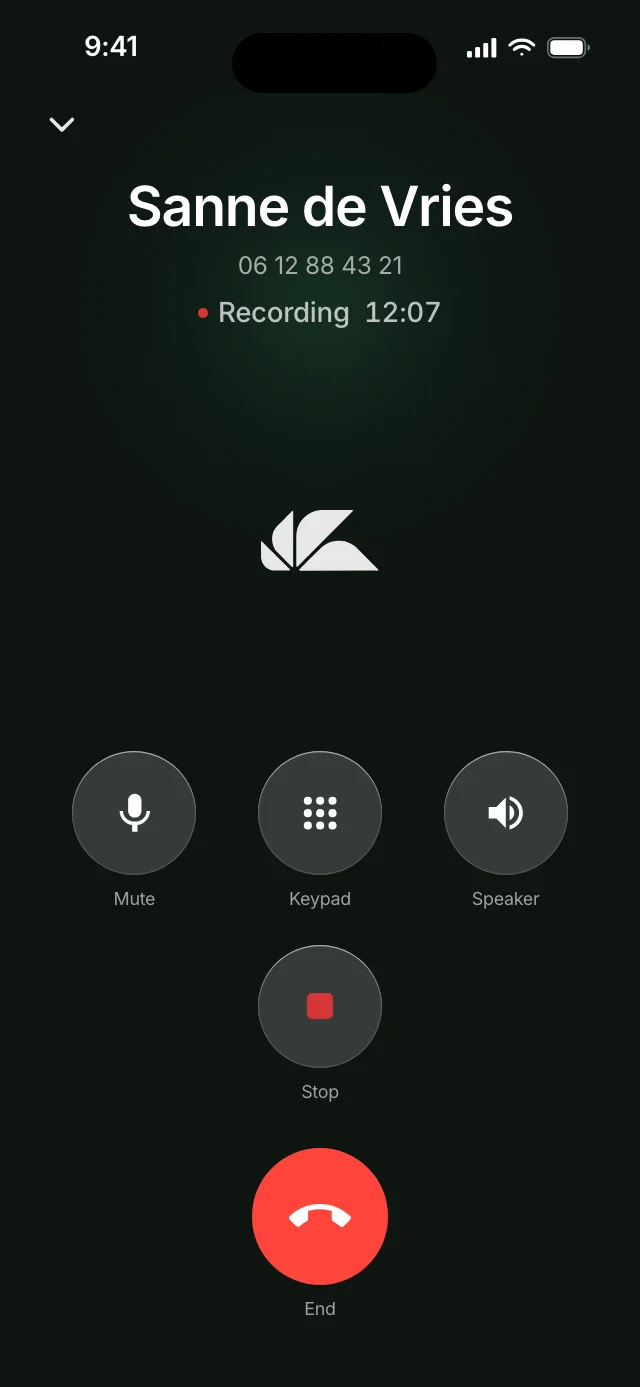
Plaud and Pocket are microphones you carry, buy and charge. Across a table, your phone does the same job with the Ajora app, without that second device. For a phone call those devices have to be stuck to the back of your phone, you have to press record on every call, and you cannot use earbuds. Ajora is attached to the line rather than to your phone and runs fully automatically: outgoing you dial from the app, incoming runs through forwarding, and during the call there is nothing to operate and nothing to forget.
Ajora records your phone calls automatically. A few minutes after you hang up, a summary with action items is ready.
What is the difference between Plaud, Pocket and Ajora?
Plaud and Pocket are separate devices with a microphone in them; Ajora is an app that joins the line and, for an in-person conversation, uses your phone’s microphone. In the same room that comes down to the same thing, only without a device to buy and charge. On a phone call a device runs into three conditions: it has to be on your phone, you have to press record on every call, and earbuds are out.
The question is always the same: how do you still know what was agreed after a conversation, without taking notes yourself. There are three ways to get there, and the difference is where the microphone sits.
Plaud, a recording device
The clear leader in this corner of the market. In Plaud’s European store the Plaud Note Pro costs €189, the Note €169.90, the NotePin €169.90 and the NotePin S €179. The Note Pro has four microphones and a range of up to five metres. For phone calls the Note and the Note Pro have a vibration sensor that reads the sound out of your phone’s casing; the two NotePins only record conversations in the room. A subscription comes on top: Starter is free with 300 transcription minutes a month, Pro costs €110.99 a year with 1,200 minutes, Unlimited €224.99 a year.
Pocket, a card on your phone
Built by Open Vision Engineering, backed by Y Combinator, on sale since 2025 and with 11 million dollars raised in June 2026. It is a card that snaps magnetically onto the back of your phone, with two microphones for the room and a contact microphone for phone calls. In the Dutch store it costs €139 on offer, down from €213; the American product page says 129 dollars. The free plan has unlimited transcription at standard accuracy and keeps summaries for 30 days. Pro costs 239.88 dollars a year on the product page, €255 in the Dutch store.
Ajora, no device
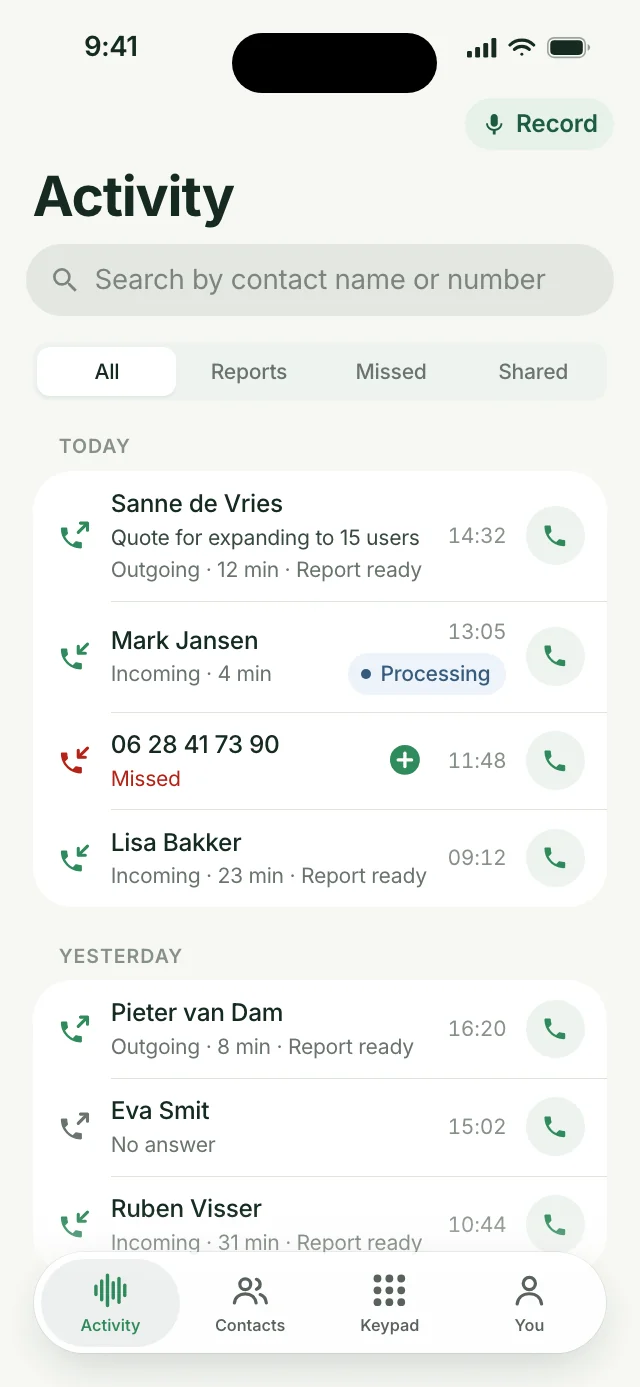
Ajora has no hardware. For outgoing calls you dial from the Ajora app, for incoming calls you switch on forwarding and your calls come along on their own. You get a summary with action items, decisions and the full transcript. For conversations you are sitting in yourself there is a Record button in the same app (on Android: Capture). €19 a month, or €15 a month billed yearly, with 600 calling minutes included.
Should you buy Plaud or Pocket?
Buy Plaud if you mostly record meetings in a room and want the more established product with 300 free transcription minutes a month. Buy Pocket AI if you want the cheaper device and unlimited transcription on the free plan. If you mostly make phone calls, neither fits well: both need the device on the back of your phone and a press of the button on every call, and according to Plaud its device does not work with earbuds in. Pocket uses the same principle. If calls are most of your work, Ajora, a Dutch app that joins your phone calls, fits better: it captures incoming calls too and works with earbuds in, with no device to carry.
Plaud fits when the meeting room is the main use
The Note Pro has four microphones and a range of up to five metres, which is the strongest setup of the two for a table with several people around it. Plaud has been around longer, its iPhone app is rated 4.9 from 23,623 ratings in the American App Store, and it has its own MCP connection to Claude and ChatGPT, still marked beta on its pricing page. Pick the Note or the Note Pro if you also want to record a call now and then; the NotePin and NotePin S cannot do that.
Pocket fits when price and convenience come first
Pocket costs €139 in the Dutch store against €169.90 for the cheapest Plaud, it stays on your phone through MagSafe, and the free plan transcribes without a minute limit. The catch is that free summaries disappear after 30 days, so for an archive you end up on Pro. Pocket is the younger company, and the reviews below show it. What Pocket itself does and costs, with its Trustpilot reviews, is in the Pocket AI review.
For phone calls the choice between the two matters less than it seems. Both read the call out of your phone’s casing, so both depend on how the device sits and how loud your phone is, and neither starts by itself. If calling is most of your work, an app that joins the line, such as Ajora, is the better fit. The sections below explain why.
How do you capture an in-person conversation?
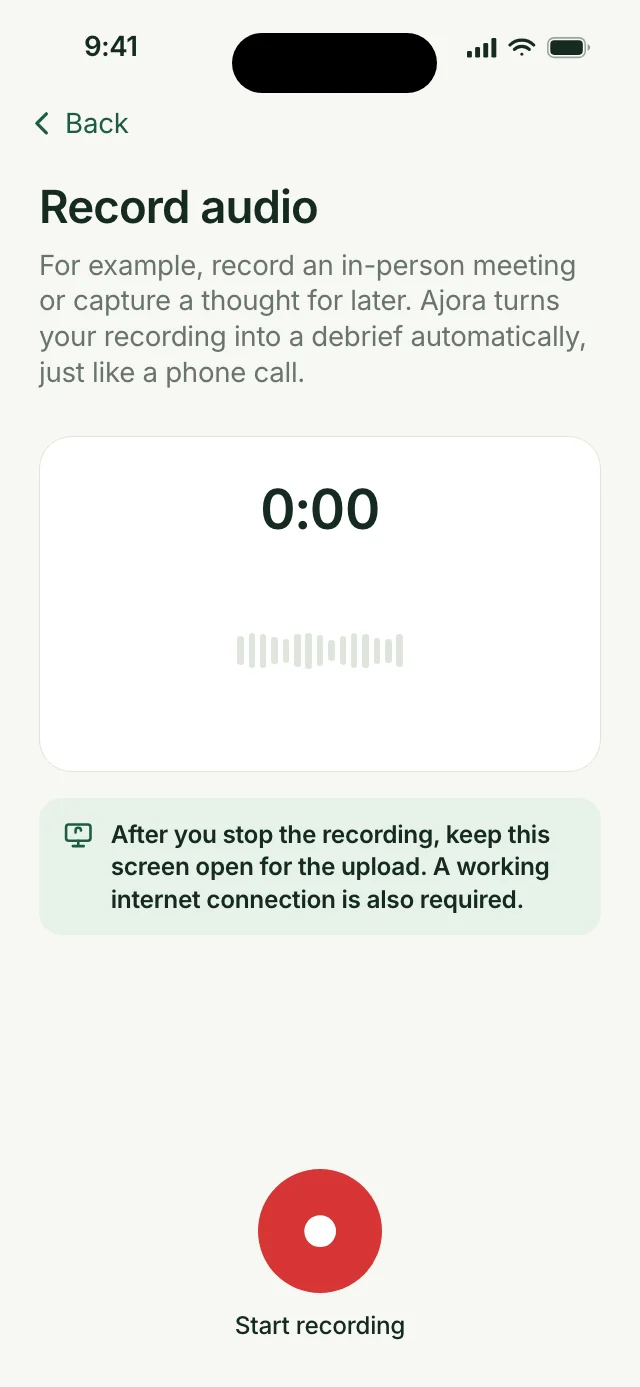
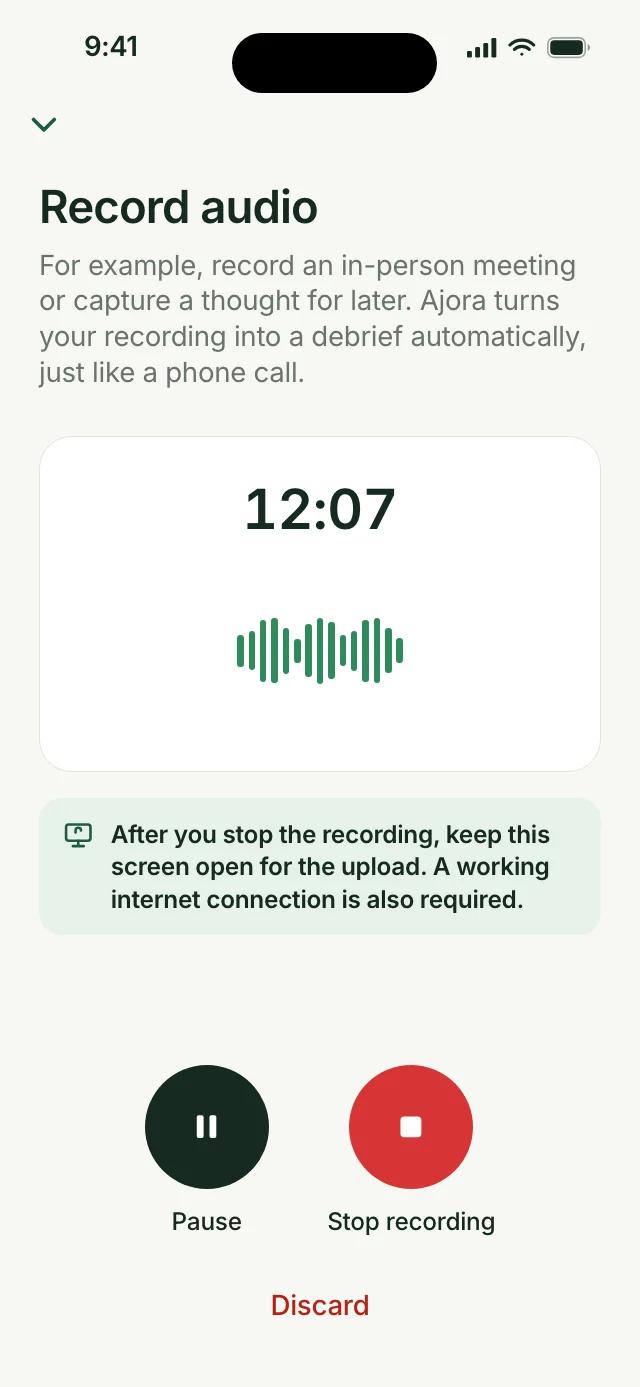
With the same app. Tap Record (on Android: Capture), press Start recording and put your phone down. You get the same debrief as from a phone call, with recognition of who says what.
So no device is involved. A recording device has to be bought, carried and kept charged, and the phone it clips onto is already lying in front of you anyway. Plaud names a range of about five metres and Pocket claims fifteen; in a meeting with a few people, your phone’s microphone sits just as close to the speakers as a device lying next to it.
Can Plaud and Pocket record phone calls?
The devices can, but only if they are stuck to the back of your phone, you press record on every call yourself, and you are not using earbuds. Plaud spells out all three conditions in its own manual and support pages. The Plaud One earbuds record calls without a device on your phone, but you still start every recording yourself, and on 17-10-2026 they could not be ordered.
A phone call is a different problem from a conversation in the same room. iOS and Android hand call audio to no app at all, so a device has to get the sound from somewhere else. Plaud and Pocket both do it by feeling the sound in the phone itself: Plaud with a vibration sensor, Pocket with a contact microphone. Clever, and it works. At Plaud this goes for the Note and the Note Pro; the NotePin and NotePin S have no phone call mode at all. Three conditions come with it.
The device has to be on your phone
Plaud writes it in their own support pages: the device has to be attached to the back of your phone, because the vibration sensor needs to pick the sound up directly from the phone’s speaker. If the device is in your bag or on your desk, it does not record your phone call.
You have to press record on every call
Asked whether Plaud records phone calls automatically, their own answer is short: no. Operating systems will not let an app watch call events all day, so you attach the device and press record. The same principle applies to Pocket. For an incoming call that means answering and thinking about a gadget at the same time.
No earbuds
This is the condition most people meet only after buying. Plaud states it plainly: because the vibration sensor reads both sides of the conversation out of the phone, using headphones during call recording is not supported. So no AirPods, and no hands-free in the car. Exactly the two moments when you call most and can write least. Plaud now has earbuds of its own that do record both sides of a phone call, the Plaud One at €249.90. You still start each recording yourself, with a button or by saying ‘Hey Plaud’, and on 17-10-2026 they could not be ordered: it is a run of 2,000 units, the pre-order has closed and there is a waitlist.
Ajora does not have this problem, because it does not listen in, it joins the call. The conversation runs over the line, not through a microphone. That is why it works with earbuds in, with the phone at your ear, or hands-free in the car, and why it can already be on for incoming calls.
How good does a phone call recorded by a device actually sound?
That depends on your phone, because the device reads the sound through the housing. Plaud lists the matching complaints in its own support pages: phone-call recordings that are hard to hear, recordings with only your own voice and not the other party, and recordings that come back too loud and distorted.
That is not a defect, it is the route. What gets recorded is not the call itself but the vibration left of it in your handset. The support page about poor sound quality lists what you have to get right:
- Set your call volume to at least 80 percent.
- Take a thick case off, because it dampens the recording.
- Use no earphones or headphones, wired or wireless: the device picks up the sound from the phone’s speaker.
- On speakerphone, take the device off your phone and put it down next to it, otherwise it records the call twice and comes out distorted.
- Do not touch the device during the call, because dragging and tapping end up in the recording.
That is five things that have to be right before anything usable comes out, and a transcript is never better than the recording underneath it. Ajora sits on the line: what gets written out is the call itself. No volume level to get right, no case that can be too thick, and no side of the conversation that can drop out.
Plaud, Pocket or Ajora: what are the differences?
Plaud is strongest in the room, Pocket is the cheaper piece of hardware, and Ajora is the only one of the three that captures a phone call without any action, earbuds included. The full comparison is in the table below.
| Plaud | Ajora | ||
|---|---|---|---|
| What it is | A recording device of €169.90 to €189. | A €139 card that snaps onto your phone. | An app on the phone you already have. |
| In-person conversation | Four microphones and around five metres on the Note Pro, according to Plaud. | Two microphones, up to fifteen metres according to Pocket. | Your phone’s microphone, in the Ajora app. No device needed. |
| Phone call | The Note and Note Pro, when stuck to your phone. The Plaud One earbuds too, but they could not be ordered on 17-10-2026. | Only when the card is on your phone. | Runs over the line. Nothing has to be attached to your phone. |
| Where the sound comes from | Through your phone’s housing. Call volume at least 80 percent, no thick case. | Through a contact microphone against your phone. | From the line: the call itself. |
| Automatic on a call | No. Plaud says it themselves: attach it and press record. | No, also an action on every call. | Outgoing you dial from the app, incoming runs to Ajora fully automatically through call forwarding. |
| With earbuds or hands-free | Not with the Note or Note Pro. The Plaud One earbuds can, but could not be ordered on 17-10-2026. | Pocket says nothing about this. The contact microphone reads the phone itself, so do not count on it. | Yes. |
| What you carry and charge | The device plus its magnetic case. | The card, battery of about four days. | Nothing extra. |
| Cost to start | €189 for the Note Pro, €169.90 for the Note. | €139 in the Dutch store, 129 dollars in the American one. | No hardware. |
| Subscription | Free with 300 minutes a month. Pro €110.99 a year with 1,200 minutes a month. Unlimited €224.99 a year. | Free with unlimited transcription at standard accuracy, summaries kept for 30 days. Pro 239.88 dollars a year, €255 in the Dutch store. | €19 a month, or €15 billed yearly. |
| Calling minutes | Not included. | Not included. | 600 a month included. |
| Where your data sits | Servers in the United States, Germany, Japan and Singapore, assigned by your region. | Transcription and summaries on cloud infrastructure in the United States, according to Pocket itself. | Transcripts and summaries on servers in Germany. Transcription runs through a processor in the United States, after which the audio is deleted. |
| Training AI models | Excluded, unless you give consent yourself. | Excluded. Pocket says recordings and transcripts are not sold or used for training. | Excluded, in writing with the processors. |
| Data processing agreement | Not published as a separate document. They do use standard contractual clauses and an EU representative. | Not found. | On the site and ready to sign. |
Plaud or Pocket: which is better value over a year?
On the cheapest paid plans Plaud is cheaper in the first year: a Plaud Note with Pro, capped at 1,200 minutes a month, costs €280.89, a Pocket with Pro €394. Without a minute cap they cost almost the same, as a Plaud Note with Unlimited comes to €394.89. Without a subscription Pocket is cheaper at €139 and transcribes without a limit.
| Device and plan, prices in European stores | First year | Every year after |
|---|---|---|
| Plaud Note, Starter (300 minutes a month) | €169.90 | €0 |
| Plaud Note, Pro billed yearly (1,200 minutes a month) | €280.89 | €110.99 |
| Plaud Note, Unlimited billed yearly | €394.89 | €224.99 |
| Plaud Note Pro, Starter | €189 | €0 |
| Plaud Note Pro, Pro billed yearly | €299.99 | €110.99 |
| Pocket, Free (summaries kept for 30 days) | €139 | €0 |
| Pocket, Pro billed yearly | €394 | €255 |
| Ajora, yearly plan (600 call minutes a month, no device) | €180 | €180 |
| Ajora, monthly plan | €228 | €228 |
Prices from Plaud’s European store and Pocket’s Dutch store, checked on 17-10-2026. Pocket AI’s American product page lists 129 dollars for the device and 239.88 dollars a year for Pro; the Dutch store charges €255 for twelve months. Pocket runs changing offers, so check the price at checkout. With a device your call minutes keep running through your own carrier. With Ajora they are part of the subscription, but Ajora is not a recorder for a meeting room, so the comparison only holds if most of your conversations are phone calls. Ajora needs no device; you can use it free for a week on your normal calls before you spend €139 or more on a recorder.
What are the most common complaints about Plaud and Pocket?
In recent App Store reviews the complaints about Plaud are mostly about exporting and syncing, and after that about cancelling. About Pocket they are mostly about the subscription and getting a refund. Plaud and Pocket both still rate high in the American App Store: Plaud at 4.9 from 23,623 ratings, Pocket at 4.9 from 6,807.
The Plaud and Pocket apps both rate highly, so this is the minority. But the complaints about Plaud and Pocket that exist come back across different people and are about the same things. The reviews that praise Plaud and Pocket are mostly about the summaries: people who no longer take notes during a conversation and find what their device produces good enough to work from.
Plaud: exporting and cancelling
Besides exporting and cancelling, Plaud buyers are caught out by the subscription that comes with it. The dated reviews, and what reviewers and Trustpilot say about Plaud, are under Plaud review: what do users say? in the piece on Plaud alternatives.
Pocket: a young product and a subscription you notice late
Pocket has been on sale since 2025 and you can tell in this year’s reviews. A Pocket update on 07-05-2026 broke syncing; on 12-06-2026 a feature suddenly sat behind Pocket Pro; on 11-06-2026 transcripts came back in the wrong language; on 07-05-2026 a device bricked during setup after which getting a refund was hard. The German App Store carries the same complaint about getting a refund from Pocket on 15-07-2026. Since September the complaints about Pocket are mostly about the subscription: on 05-10-2026 an American reviewer only found the 239 dollars a year for Pro after creating an account, and on 10-10-2026 a Dutch reviewer calls the push towards a subscription irritating. On 16-09-2026 a Pocket user reports four lost meeting recordings and a refused return.
Where are your recordings stored with Plaud, Pocket and Ajora?
Plaud spreads your data across servers in the United States, Germany, Japan and Singapore, assigned by region. Pocket transcribes and summarises on cloud infrastructure in the United States. With Ajora the transcripts sit encrypted in Germany; turning audio into text runs through a processor in the United States, after which the audio is deleted.
Plaud has this better organised than the average American app. They run servers in the United States, Germany, Japan and Singapore and route your data to the nearest region, they exclude training on your recordings unless you consent, they use standard contractual clauses, and they have a representative in the EU. What is not in there is encryption with a key tied to your account only, and a data processing agreement you can sign.
With Pocket the picture is vaguer. Its trust page says transcription and summaries run on cloud infrastructure in the United States and that recordings and transcripts are not used to train AI models, but it names no cloud provider, no storage region and no concrete retention period. A data processing agreement is not mentioned; a Business Associate Agreement for American healthcare is, on the Enterprise plan.
Ajora sits differently here: the transcripts always stay in Germany and are encrypted with a key tied to your account only, so nobody but you can read them. If you cancel, that key is destroyed first, then your data is wiped within 30 days and out of the backups within 90. On top of that you can sign a data processing agreement, which you need the moment you work with client data. The technical side is on security.
What fits the way you work?
If calling is part of your job, Ajora is the choice: every call is captured without you doing anything, including the incoming call you were not expecting. If you are mostly in large meeting rooms, a device earns its money, and the two do not rule each other out.
They are not competing for the same minute. A device is built for the room, Ajora for the line. Sit down with six people and that is a device’s terrain. Sit in the car, with earbuds in, getting called as often as you call, and a device captures nothing there while Ajora captures everything.
Plenty of people who end up at Ajora bought a device first and noticed it works fine in a meeting and not on the phone. That is not a bad product, that is a different product. What a good call summary contains, and which routes exist for phone calls, is in AI note taker for phone calls.
Frequently asked questions
Is the sound quality of a recording device good enough?
In person, yes. On phone calls it depends, because the sound arrives through your phone’s housing. Plaud describes the matching complaints in its own support pages: hard to hear, only your own voice, or too loud and distorted. Your call volume has to be at 80 percent or more and a thick case has to come off. Ajora takes the call from the line, so none of that applies.
Does Plaud work with earbuds or AirPods?
The Plaud Note and Note Pro do not, when you are recording a phone call. Plaud states itself that headphones are not supported then, because the vibration sensor reads both sides of the call out of the phone housing, and Pocket works on the same principle. Hands-free in the car is out for the same reason. Plaud has recently brought out its own earbuds that do record calls, the Plaud One at €249.90, in a run of 2,000 units. The pre-order has closed and on 17-10-2026 all you could do was join a waitlist. Ajora does not have that problem: the call runs over the line, so earbuds, car speaker or phone at your ear make no difference.
Can a recording device capture every phone call automatically?
No. Plaud says itself that automatic phone call recording is not possible, because iOS and Android do not let an app watch call events all day, and the same goes for Pocket. It only becomes automatic when the capturing sits on the line: with Ajora you switch on call forwarding once and every call comes along after that, incoming and outgoing, with no action from you.
What is an alternative to Plaud if you are mostly on the phone?
Ajora. Capturing then does not hang on a device that has to be stuck to your phone, but on the line: outgoing you dial from the app, incoming runs through call forwarding, and it works with earbuds in and hands-free in the car. The exact situations where a device records nothing are the situations where Ajora simply keeps running. The full trade-off, with the cost per year, is in Plaud alternative: what works better if you are mostly on the phone?.
Can a Plaud record phone calls?
The Plaud Note and Note Pro can, but only when the device is magnetically attached to the back of your phone, you press record yourself, and you are not using earbuds. Plaud confirms that automatic phone call recording is not possible, because operating systems do not allow it. The Plaud One, Plaud’s earbuds that do record calls, could not be ordered on 17-10-2026, and with those too you start every recording yourself. If you want it to happen by itself, the capturing has to sit on the line rather than on a device: that is what Ajora does.
Does Pocket record phone calls?
Yes. Alongside two regular microphones Pocket has a contact microphone that picks up phone calls without you having to turn on the speaker. Here too the card has to be on your phone and you start it yourself on every call, so an incoming call is over before you think of it. With Ajora that call is already running.
What does Plaud cost in total?
In Plaud’s European store the device is a one-off €169.90 to €189, and a subscription comes on top: Starter is free with 300 transcription minutes a month, Pro costs €110.99 a year with 1,200 minutes, Unlimited €224.99 a year. A Plaud Note with Pro comes to €280.89 in the first year. Calling minutes are not included, those run on your own plan. Ajora is €19 a month with no hardware, 600 call minutes included and fourteen days money back.
Can Plaud or Pocket connect to Claude, ChatGPT or a CRM?
Plaud has its own MCP connection, listed on all plans and still marked beta, that lets Claude and ChatGPT search your recordings and read the transcripts and summaries. Plaud is in Claude’s connector directory and ChatGPT’s plugin directory, so it installs in one click. It also connects to Zapier, and Salesforce is part of its Team plan. Pocket lists ChatGPT, Claude and MCP on its product page, with API keys and webhooks only on Enterprise. Neither names a ready-made HubSpot integration. Ajora has an MCP connection for Claude and ChatGPT for your phone calls, which you add as a custom connector. Ajora has no ready-made HubSpot integration either: HubSpot, Salesforce and other CRMs connect through the API and webhooks, for example with Zapier or Make. Apollo does have a ready-made integration.
Do I need a device to record an in-person conversation?
No. In the Ajora app you tap Record (on Android: Capture), press Start recording and put your phone on the table. You get the same debrief as from a phone call, with speaker recognition, out of the same app your calls are in. A device does the same job there, but with hardware you have to buy, carry and charge.
Am I allowed to record all of this?
In the Netherlands you may record a conversation you take part in yourself. If you use it for work, you are processing personal data and the GDPR applies. That is written out in a separate piece: is it legal to record a call.
Every AI voice recorder side by side, with TicNote and Soundcore added, is in AI voice recorder. If you are looking for a recording app rather than a device, read Ajora vs TapeACall too. Not sure whether Ajora fits the way you work? Get in touch or have a look at the frequently asked questions.
You can try Ajora free for seven days, with 60 call minutes and no payment details needed. Create your account at debrief.ajora.io/register, download the app for iPhone or Android and sign in with the same details. Teams do not get a trial: see Ajora for sales teams.
Sources
- Plaud devices compared: prices, microphones, range and which ones record phone callsplaud.ai, accessed 17-10-2026
- Plaud Note Pro, specifications and priceplaud.ai, accessed 17-10-2026
- Plaud One Explorer Edition, product page with price, run size, recording modes and waitlistplaud.ai, accessed 17-10-2026
- Plaud AI plans: prices, minutes per plan, integrations and what happens when you cancelplaud.ai, accessed 17-10-2026
- Does Plaud Note support automatic call recording?Plaud Support, accessed 17-10-2026
- Low volume or poor sound quality on Plaud Note Pro, with the requirements for call volume, case and placementPlaud Support, accessed 17-10-2026
- Can I use headphones or earphones when I record a phone call with Plaud Note?Plaud Support, accessed 17-10-2026
- Plaud MCP: connecting Claude, ChatGPT and other AI assistants to your recordingsPlaud Support, accessed 17-10-2026
- Privacy policy with the server regions and the model training exclusionPlaud, accessed 17-10-2026
- Pocket, product page with microphones, prices, plans and integrationsheypocket.com, accessed 17-10-2026, in the American and the Dutch store
- Pocket Trust: where transcription runs and the model training exclusionheypocket.com, accessed 17-10-2026
- Pocket raises 11M in bet on rising demand for AI note-taking devicesTechCrunch, 29-06-2026
- Plaud: AI Note Taker in the Dutch App Store, rating and reviewsApple App Store, accessed 06-09-2026 and 17-10-2026
- Plaud: AI Note Taker in the American App Store, recent reviewsApple App Store, accessed 06-09-2026 and 17-10-2026
- Pocket - AI Personal Assistant in the American App Store, rating and recent reviewsApple App Store, accessed 06-09-2026 and 17-10-2026
- Pocket - AI Personal Assistant in the Dutch App Store, recent reviewsApple App Store, accessed 17-10-2026
- Pocket - AI Personal Assistant in the German App Store, recent reviewsApple App Store, accessed 17-10-2026

One of the three co-founders of Ajora. Jort focuses on user experience and growth.